<?xml version="1.0" encoding="utf-8"?><feed xmlns="http://www.w3.org/2005/Atom" ><generator uri="https://jekyllrb.com/" version="3.10.0">Jekyll</generator><link href="https://agenticworld.co.in/feed.xml" rel="self" type="application/atom+xml" /><link href="https://agenticworld.co.in/" rel="alternate" type="text/html" /><updated>2026-07-31T00:17:08+05:30</updated><id>https://agenticworld.co.in/feed.xml</id><title type="html">Agentic World</title><subtitle>Blog on Agentic AI and enterprise architecture.</subtitle><entry><title type="html">The Evolution of Agentic AI</title><link href="https://agenticworld.co.in/2026/07/30/agentic-evolution/" rel="alternate" type="text/html" title="The Evolution of Agentic AI" /><published>2026-07-30T23:10:00+05:30</published><updated>2026-07-30T23:10:00+05:30</updated><id>https://agenticworld.co.in/2026/07/30/agentic-evolution</id><content type="html" xml:base="https://agenticworld.co.in/2026/07/30/agentic-evolution/"><![CDATA[<h1 id="the-evolution-of-agentic-ai---a-journey">The Evolution of Agentic AI - A Journey</h1>

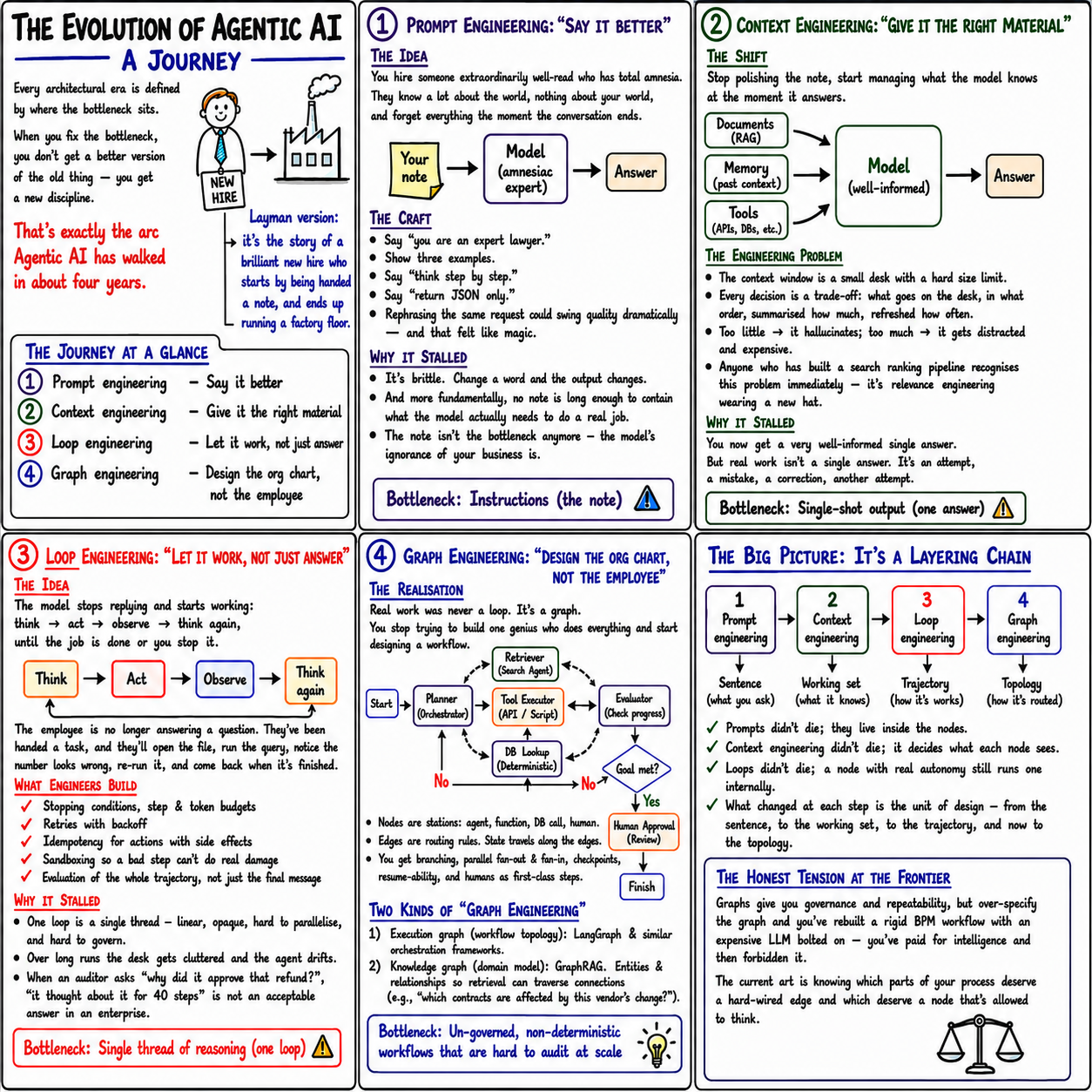
<p><em>Every architectural era is defined by where the bottleneck sits. When you fix a bottleneck, you don’t get a better version of the old thing - you get a whole new discipline. That’s exactly the arc Agentic AI has walked in about four years: four bottlenecks, four disciplines.</em></p>

<p>Told through one running analogy - <strong>a brilliant new hire</strong> who starts by being handed a note and ends up running a factory floor.</p>

<p><img src="/assets/images/2026-07-30-agentic-evolution/agentic-evolution.png" alt="Alt text" /></p>

<hr />

<h2 id="the-journey-at-a-glance">The journey at a glance</h2>

<table>
  <thead>
    <tr>
      <th>Stage</th>
      <th>Discipline</th>
      <th>In a phrase</th>
    </tr>
  </thead>
  <tbody>
    <tr>
      <td>1</td>
      <td><strong>Prompt engineering</strong></td>
      <td>Say it better</td>
    </tr>
    <tr>
      <td>2</td>
      <td><strong>Context engineering</strong></td>
      <td>Give it the right material</td>
    </tr>
    <tr>
      <td>3</td>
      <td><strong>Loop engineering</strong></td>
      <td>Let it work, not just answer</td>
    </tr>
    <tr>
      <td>4</td>
      <td><strong>Graph engineering</strong></td>
      <td>Design the org chart, not the employee</td>
    </tr>
  </tbody>
</table>

<hr />

<h2 id="1-prompt-engineering---say-it-better">1. Prompt Engineering - “say it better”</h2>

<p><strong>The idea.</strong> You’ve hired someone extraordinarily well-read but with total amnesia: they know everything about the world, nothing about <em>your</em> world, and forget it all the moment the conversation ends.</p>

<p><strong>The craft.</strong> So at first you obsess over <em>how you word the note</em> you hand them:</p>

<ul>
  <li>“You are an expert lawyer.”</li>
  <li>Show three examples.</li>
  <li>“Think step by step.”</li>
  <li>“Return JSON only.”</li>
</ul>

<p>Rephrasing the same request could swing quality dramatically - and that felt like magic.</p>

<p><strong>Why it stalled.</strong> It’s brittle: change a word and the output changes. And more fundamentally, no note is ever long enough to contain what the model needs to do a real job. The wording was never the bottleneck - the model’s <em>ignorance of your business</em> was.</p>

<blockquote>
  <p><strong>Bottleneck: Instructions (the note)</strong></p>
</blockquote>

<hr />

<h2 id="2-context-engineering---give-it-the-right-material">2. Context Engineering - “give it the right material”</h2>

<p><strong>The shift.</strong> Stop polishing the note; start managing <em>what the model actually knows the moment it answers</em> - feeding it your documents (RAG), past context (memory), and live data (tools).</p>

<p><strong>The engineering problem.</strong> The context window is a <strong>small desk with a hard size limit</strong>. Every decision is a trade-off: what goes on the desk, in what order, summarised how much, refreshed how often.</p>

<ul>
  <li>Too little → it hallucinates.</li>
  <li>Too much → it gets distracted (and expensive).</li>
  <li>Anyone who’s built a search-ranking pipeline recognises this instantly - it’s relevance engineering wearing a new hat.</li>
</ul>

<p><strong>Why it stalled.</strong> You now get a very well-informed <em>single</em> answer. But real work isn’t a single answer. It’s an attempt, a mistake, a correction, another attempt.</p>

<blockquote>
  <p><strong>Bottleneck: Single-shot output (one answer)</strong></p>
</blockquote>

<hr />

<h2 id="3-loop-engineering---let-it-work-not-just-answer">3. Loop Engineering - “let it work, not just answer”</h2>

<p><strong>The idea.</strong> The model stops <em>replying</em> and starts <em>working</em>:</p>

<blockquote>
  <p>think → act → observe → think again - until the job is done, or you stop it.</p>
</blockquote>

<p>The employee is no longer answering a question. They’ve been handed a task: they’ll open the file, run the query, notice a number looks wrong, re-run it, and come back when it’s finished.</p>

<p><strong>What engineers build here.</strong></p>

<ul>
  <li>Stopping conditions, step &amp; token budgets</li>
  <li>Retries with backoff</li>
  <li>Idempotency for actions with side effects</li>
  <li>Sandboxing, so a bad step can’t do real damage</li>
  <li>Evaluation of the whole <em>trajectory</em>, not just the final message</li>
</ul>

<p><strong>Why it stalled.</strong> One loop is a single thread - linear, opaque, hard to parallelise and govern. Over long runs the desk gets cluttered and the agent drifts. And when an auditor asks <em>“why did it approve that refund?”</em>, “it thought about it for 40 steps” is not an acceptable answer in an enterprise.</p>

<blockquote>
  <p><strong>Bottleneck: Single thread of reasoning (one loop)</strong></p>
</blockquote>

<hr />

<h2 id="4-graph-engineering---design-the-org-chart-not-the-employee">4. Graph Engineering - “design the org chart, not the employee”</h2>

<p><strong>The realisation.</strong> Real work was never a loop - it’s a <strong>graph</strong>. You stop trying to build one genius who does everything and start designing a <em>workflow</em>.</p>

<p>A planner (orchestrator) routes to a tool executor, a database lookup, and an evaluator that checks progress - with a human approval step before anything final.</p>

<ul>
  <li><strong>Nodes</strong> are stations: an agent, a function, a DB call, a human.</li>
  <li><strong>Edges</strong> are routing rules. State travels along the edges.</li>
  <li>You get branching, parallel fan-out &amp; fan-in, checkpoints, resume-ability, and humans as first-class steps.</li>
</ul>

<p><strong>Two kinds of “graph engineering”</strong> - people use one term for two things:</p>

<ol>
  <li><strong>Execution graph</strong> (workflow topology): LangGraph &amp; similar orchestration frameworks.</li>
  <li><strong>Knowledge graph</strong> (domain model): GraphRAG - entities &amp; relationships so retrieval can traverse connections (e.g. “which contracts are affected by this vendor’s change?”).</li>
</ol>

<blockquote>
  <p><strong>Bottleneck: Un-governed, non-deterministic workflows that are hard to audit at scale</strong></p>
</blockquote>

<hr />

<h2 id="the-big-picture---its-a-layering-chain">The big picture - it’s a layering chain</h2>

<p>Each stage didn’t <em>replace</em> the last - it <strong>absorbed</strong> it.</p>

<table>
  <thead>
    <tr>
      <th>Stage</th>
      <th>Unit of design</th>
      <th>What it controls</th>
    </tr>
  </thead>
  <tbody>
    <tr>
      <td>1. Prompt engineering</td>
      <td>Sentence</td>
      <td>What you ask</td>
    </tr>
    <tr>
      <td>2. Context engineering</td>
      <td>Working set</td>
      <td>What it knows</td>
    </tr>
    <tr>
      <td>3. Loop engineering</td>
      <td>Trajectory</td>
      <td>How it works</td>
    </tr>
    <tr>
      <td>4. Graph engineering</td>
      <td>Topology</td>
      <td>How it’s routed</td>
    </tr>
  </tbody>
</table>

<ul>
  <li>Prompts didn’t die - they live <em>inside</em> the nodes.</li>
  <li>Context engineering didn’t die - it decides what each node sees.</li>
  <li>Loops didn’t die - a node with real autonomy still runs one internally.</li>
  <li>What changed at each step is the <strong>unit of design</strong> - from the sentence, to the working set, to the trajectory, and now to the topology.</li>
</ul>

<hr />

<h2 id="the-honest-tension-at-the-frontier">The honest tension at the frontier</h2>

<p>Graphs give you governance and repeatability. But <strong>over-specify the graph and you’ve rebuilt a rigid business-process workflow with an expensive LLM bolted on - you’ve paid for intelligence and then forbidden it.</strong></p>

<p>The current art is knowing which parts of your process deserve a <strong>hard-wired edge</strong> (predictable, auditable) and which deserve a <strong>node that’s allowed to think</strong>.</p>

<hr />

<h3 id="the-one-line-to-remember">The one line to remember</h3>

<p>The field didn’t get better at prompting - it kept moving the problem <em>up a level</em>: from wording the request, to feeding the model, to letting it work, to architecting the whole system.</p>]]></content><author><name></name></author><summary type="html"><![CDATA[The Evolution of Agentic AI - A Journey]]></summary></entry><entry><title type="html">Building your First Agent</title><link href="https://agenticworld.co.in/2026/07/28/building-agent/" rel="alternate" type="text/html" title="Building your First Agent" /><published>2026-07-28T23:12:00+05:30</published><updated>2026-07-28T23:12:00+05:30</updated><id>https://agenticworld.co.in/2026/07/28/building-agent</id><content type="html" xml:base="https://agenticworld.co.in/2026/07/28/building-agent/"><![CDATA[<h1 id="building-your-first-agent---fully-on-prem-open-source">Building Your First Agent - Fully On-Prem, Open Source</h1>

<p><em>A step-by-step guide. Everything runs on your own hardware - no API keys leave the building, no data goes to a cloud model. We climb one rung at a time: talk to the model -&gt; give it a tool -&gt; let it run the loop -&gt; give it memory -&gt; watch what it does -&gt; put a UI on it.</em></p>

<blockquote>
  <p><strong>Stack:</strong> Python · Ollama (local model) · LangChain · LangGraph · LangSmith · Open WebUI
<strong>Tested against:</strong> LangGraph v1.0 (stable), <code class="language-plaintext highlighter-rouge">langchain-ollama</code>, current <code class="language-plaintext highlighter-rouge">LANGSMITH_*</code> tracing vars.</p>
</blockquote>

<hr />

<h2 id="the-mental-model">The mental model</h2>

<p>Each tool does <strong>exactly one job</strong>. Conflating them is the most common source of confusion:</p>

<table>
  <thead>
    <tr>
      <th>Tool</th>
      <th>Its one job</th>
      <th>Where it fits in the agent loop</th>
    </tr>
  </thead>
  <tbody>
    <tr>
      <td><strong>Ollama</strong></td>
      <td>Runs the model locally, serves it at <code class="language-plaintext highlighter-rouge">localhost:11434</code></td>
      <td>The <strong>brain</strong></td>
    </tr>
    <tr>
      <td><strong>A tool-calling model</strong> (<code class="language-plaintext highlighter-rouge">llama3.1</code>, <code class="language-plaintext highlighter-rouge">qwen2.5</code>, <code class="language-plaintext highlighter-rouge">mistral</code>)</td>
      <td>Reasons and <em>decides</em> to call tools</td>
      <td>The brain’s actual weights</td>
    </tr>
    <tr>
      <td><strong>LangChain</strong></td>
      <td>Standard interface for models, tools, messages</td>
      <td>The <strong>glue</strong></td>
    </tr>
    <tr>
      <td><strong>LangGraph</strong></td>
      <td>Runs the perceive-&gt;reason-&gt;act-&gt;observe-&gt;repeat loop</td>
      <td>The <strong>orchestrator</strong></td>
    </tr>
    <tr>
      <td><strong>LangSmith</strong></td>
      <td>Traces every step for debugging &amp; audit</td>
      <td>The <strong>eyes</strong> (observability)</td>
    </tr>
    <tr>
      <td><strong>Open WebUI</strong></td>
      <td>ChatGPT-style frontend for the model / agent</td>
      <td>The <strong>face</strong></td>
    </tr>
  </tbody>
</table>

<blockquote>
  <p><strong>The #1 catch:</strong> the model <em>must natively support tool calling</em>. A chat model that doesn’t will silently never call your tools. Stick to <code class="language-plaintext highlighter-rouge">llama3.1</code>, <code class="language-plaintext highlighter-rouge">qwen2.5</code> / <code class="language-plaintext highlighter-rouge">qwen3</code>, or <code class="language-plaintext highlighter-rouge">mistral</code>.</p>
</blockquote>

<hr />

<h2 id="step-0---prerequisites--install">Step 0 - Prerequisites &amp; install</h2>

<p><strong>Install Ollama</strong> (macOS/Linux/Windows) from ollama.com, then pull a tool-capable model:</p>

<div class="language-bash highlighter-rouge"><div class="highlight"><pre class="highlight"><code>ollama pull llama3.1        <span class="c"># solid tool-caller, ~4.7GB</span>
<span class="c"># ollama pull qwen2.5        # also excellent at tool calling</span>
ollama serve                 <span class="c"># starts the local API at http://localhost:11434</span>
</code></pre></div></div>

<p><strong>Set up Python:</strong></p>

<div class="language-bash highlighter-rouge"><div class="highlight"><pre class="highlight"><code>python <span class="nt">-m</span> venv .venv <span class="o">&amp;&amp;</span> <span class="nb">source</span> .venv/bin/activate
pip <span class="nb">install</span> <span class="nt">-U</span> langchain langchain-ollama langgraph langsmith
</code></pre></div></div>

<p>Sanity check the model is up:</p>

<div class="language-bash highlighter-rouge"><div class="highlight"><pre class="highlight"><code>ollama run llama3.1 <span class="s2">"Say hello in five words."</span>
</code></pre></div></div>

<hr />

<h2 id="step-1---talk-to-the-local-model-no-agent-yet">Step 1 - Talk to the local model (no agent yet)</h2>

<p>Before anything clever, prove the brain works. This is the same thing Open WebUI does under the hood.</p>

<div class="language-python highlighter-rouge"><div class="highlight"><pre class="highlight"><code><span class="kn">from</span> <span class="nn">langchain_ollama</span> <span class="kn">import</span> <span class="n">ChatOllama</span>

<span class="n">llm</span> <span class="o">=</span> <span class="n">ChatOllama</span><span class="p">(</span>
    <span class="n">model</span><span class="o">=</span><span class="s">"llama3.1"</span><span class="p">,</span>
    <span class="n">base_url</span><span class="o">=</span><span class="s">"http://localhost:11434"</span><span class="p">,</span>
    <span class="n">temperature</span><span class="o">=</span><span class="mi">0</span><span class="p">,</span>
<span class="p">)</span>

<span class="k">print</span><span class="p">(</span><span class="n">llm</span><span class="p">.</span><span class="n">invoke</span><span class="p">(</span><span class="s">"Explain what an AI agent is in one sentence."</span><span class="p">).</span><span class="n">content</span><span class="p">)</span>
</code></pre></div></div>

<p><strong>Important Point:</strong> right now this is a <em>pure LLM</em> - smart, but no hands and no memory (rung 1 of the LLM-&gt;agent ladder). It can only produce text.</p>

<hr />

<h2 id="step-2---give-it-a-tool-and-watch-it-decide-to-use-one">Step 2 - Give it a tool (and watch it <em>decide</em> to use one)</h2>

<p>Do <strong>not</strong> skip straight to the agent abstraction. Show the raw mechanic first, or students will treat the loop as magic.</p>

<p>Define tools with the <code class="language-plaintext highlighter-rouge">@tool</code> decorator. <strong>The docstring is not optional</strong> - the model reads it to decide when and how to call the tool.</p>

<div class="language-python highlighter-rouge"><div class="highlight"><pre class="highlight"><code><span class="kn">from</span> <span class="nn">langchain_core.tools</span> <span class="kn">import</span> <span class="n">tool</span>
<span class="kn">from</span> <span class="nn">langchain_ollama</span> <span class="kn">import</span> <span class="n">ChatOllama</span>
<span class="kn">from</span> <span class="nn">langchain_core.messages</span> <span class="kn">import</span> <span class="n">HumanMessage</span>

<span class="o">@</span><span class="n">tool</span>
<span class="k">def</span> <span class="nf">multiply</span><span class="p">(</span><span class="n">a</span><span class="p">:</span> <span class="nb">int</span><span class="p">,</span> <span class="n">b</span><span class="p">:</span> <span class="nb">int</span><span class="p">)</span> <span class="o">-&gt;</span> <span class="nb">int</span><span class="p">:</span>
    <span class="s">"""Multiply two integers together.

    Args:
        a: the first integer
        b: the second integer
    """</span>
    <span class="k">return</span> <span class="n">a</span> <span class="o">*</span> <span class="n">b</span>

<span class="o">@</span><span class="n">tool</span>
<span class="k">def</span> <span class="nf">word_count</span><span class="p">(</span><span class="n">text</span><span class="p">:</span> <span class="nb">str</span><span class="p">)</span> <span class="o">-&gt;</span> <span class="nb">int</span><span class="p">:</span>
    <span class="s">"""Count the number of words in a piece of text.

    Args:
        text: the text to count words in
    """</span>
    <span class="k">return</span> <span class="nb">len</span><span class="p">(</span><span class="n">text</span><span class="p">.</span><span class="n">split</span><span class="p">())</span>

<span class="n">llm</span> <span class="o">=</span> <span class="n">ChatOllama</span><span class="p">(</span><span class="n">model</span><span class="o">=</span><span class="s">"llama3.1"</span><span class="p">,</span> <span class="n">temperature</span><span class="o">=</span><span class="mi">0</span><span class="p">)</span>
<span class="n">llm_with_tools</span> <span class="o">=</span> <span class="n">llm</span><span class="p">.</span><span class="n">bind_tools</span><span class="p">([</span><span class="n">multiply</span><span class="p">,</span> <span class="n">word_count</span><span class="p">])</span>

<span class="n">response</span> <span class="o">=</span> <span class="n">llm_with_tools</span><span class="p">.</span><span class="n">invoke</span><span class="p">(</span><span class="s">"What is 23 times 17?"</span><span class="p">)</span>
<span class="k">print</span><span class="p">(</span><span class="n">response</span><span class="p">.</span><span class="n">tool_calls</span><span class="p">)</span>
<span class="c1"># -&gt; [{'name': 'multiply', 'args': {'a': 23, 'b': 17}, 'id': '...', 'type': 'tool_call'}]
</span></code></pre></div></div>

<p>Notice: the model didn’t compute the answer - it <strong>emitted a structured request</strong> to call <code class="language-plaintext highlighter-rouge">multiply</code>. Now <em>you</em> run the tool and feed the result back, by hand, so the full round-trip is visible:</p>

<div class="language-python highlighter-rouge"><div class="highlight"><pre class="highlight"><code><span class="n">tools_by_name</span> <span class="o">=</span> <span class="p">{</span><span class="s">"multiply"</span><span class="p">:</span> <span class="n">multiply</span><span class="p">,</span> <span class="s">"word_count"</span><span class="p">:</span> <span class="n">word_count</span><span class="p">}</span>
<span class="n">messages</span> <span class="o">=</span> <span class="p">[</span><span class="n">HumanMessage</span><span class="p">(</span><span class="s">"What is 23 times 17?"</span><span class="p">)]</span>

<span class="n">ai_msg</span> <span class="o">=</span> <span class="n">llm_with_tools</span><span class="p">.</span><span class="n">invoke</span><span class="p">(</span><span class="n">messages</span><span class="p">)</span>   <span class="c1"># model decides
</span><span class="n">messages</span><span class="p">.</span><span class="n">append</span><span class="p">(</span><span class="n">ai_msg</span><span class="p">)</span>

<span class="k">for</span> <span class="n">call</span> <span class="ow">in</span> <span class="n">ai_msg</span><span class="p">.</span><span class="n">tool_calls</span><span class="p">:</span>             <span class="c1"># we execute
</span>    <span class="n">selected</span> <span class="o">=</span> <span class="n">tools_by_name</span><span class="p">[</span><span class="n">call</span><span class="p">[</span><span class="s">"name"</span><span class="p">]]</span>
    <span class="n">tool_msg</span> <span class="o">=</span> <span class="n">selected</span><span class="p">.</span><span class="n">invoke</span><span class="p">(</span><span class="n">call</span><span class="p">)</span>       <span class="c1"># returns a ToolMessage
</span>    <span class="n">messages</span><span class="p">.</span><span class="n">append</span><span class="p">(</span><span class="n">tool_msg</span><span class="p">)</span>

<span class="n">final</span> <span class="o">=</span> <span class="n">llm_with_tools</span><span class="p">.</span><span class="n">invoke</span><span class="p">(</span><span class="n">messages</span><span class="p">)</span>    <span class="c1"># model reads the result, answers
</span><span class="k">print</span><span class="p">(</span><span class="n">final</span><span class="p">.</span><span class="n">content</span><span class="p">)</span>                       <span class="c1"># -&gt; "23 times 17 is 391."
</span></code></pre></div></div>

<p><strong>Important point:</strong> <em>that four-step dance - decide -&gt; execute -&gt; feed back -&gt; answer - is the entire agent loop.</em> Everything after this just automates it.</p>

<hr />

<h2 id="step-3---let-langgraph-run-the-loop-this-is-the-agent">Step 3 - Let LangGraph run the loop (this is the agent)</h2>

<p>Now hand the loop to LangGraph’s prebuilt ReAct agent. It does exactly what you just did by hand, repeatedly, until the task is done.</p>

<div class="language-python highlighter-rouge"><div class="highlight"><pre class="highlight"><code><span class="kn">from</span> <span class="nn">langgraph.prebuilt</span> <span class="kn">import</span> <span class="n">create_react_agent</span>
<span class="kn">from</span> <span class="nn">langchain_ollama</span> <span class="kn">import</span> <span class="n">ChatOllama</span>

<span class="n">llm</span> <span class="o">=</span> <span class="n">ChatOllama</span><span class="p">(</span><span class="n">model</span><span class="o">=</span><span class="s">"llama3.1"</span><span class="p">,</span> <span class="n">temperature</span><span class="o">=</span><span class="mi">0</span><span class="p">)</span>

<span class="n">agent</span> <span class="o">=</span> <span class="n">create_react_agent</span><span class="p">(</span>
    <span class="n">model</span><span class="o">=</span><span class="n">llm</span><span class="p">,</span>
    <span class="n">tools</span><span class="o">=</span><span class="p">[</span><span class="n">multiply</span><span class="p">,</span> <span class="n">word_count</span><span class="p">],</span>
    <span class="n">prompt</span><span class="o">=</span><span class="s">"You are a helpful assistant. Use tools when they help."</span><span class="p">,</span>
<span class="p">)</span>

<span class="k">for</span> <span class="n">chunk</span> <span class="ow">in</span> <span class="n">agent</span><span class="p">.</span><span class="n">stream</span><span class="p">(</span>
    <span class="p">{</span><span class="s">"messages"</span><span class="p">:</span> <span class="p">[{</span><span class="s">"role"</span><span class="p">:</span> <span class="s">"user"</span><span class="p">,</span>
                   <span class="s">"content"</span><span class="p">:</span> <span class="s">"What is 23 times 17, and how many words are in that question?"</span><span class="p">}]},</span>
    <span class="n">stream_mode</span><span class="o">=</span><span class="s">"updates"</span><span class="p">,</span>
<span class="p">):</span>
    <span class="k">print</span><span class="p">(</span><span class="n">chunk</span><span class="p">)</span>
</code></pre></div></div>

<p>You’ll see it reason, call <code class="language-plaintext highlighter-rouge">multiply</code>, observe the result, call <code class="language-plaintext highlighter-rouge">word_count</code>, observe again, then compose a final answer - the <strong>perceive -&gt; reason -&gt; act -&gt; observe -&gt; repeat</strong> loop, automated. <strong>This is the moment it becomes an agent.</strong></p>

<blockquote>
  <p><code class="language-plaintext highlighter-rouge">create_react_agent</code> lives in <code class="language-plaintext highlighter-rouge">langgraph.prebuilt</code>. If a tutorial you find online uses <code class="language-plaintext highlighter-rouge">set_entry_point()</code> or hand-rolls a <code class="language-plaintext highlighter-rouge">StateGraph</code> for a basic agent, it predates v1.0 - you don’t need that for a simple agent.</p>
</blockquote>

<hr />

<h2 id="step-4---give-it-memory">Step 4 - Give it memory</h2>

<p>Right now each call starts from zero (a colleague with amnesia). Add a <strong>checkpointer</strong> and a <code class="language-plaintext highlighter-rouge">thread_id</code>, and the agent remembers within a conversation thread - this is short-term / working memory.</p>

<div class="language-python highlighter-rouge"><div class="highlight"><pre class="highlight"><code><span class="kn">from</span> <span class="nn">langgraph.checkpoint.memory</span> <span class="kn">import</span> <span class="n">MemorySaver</span>
<span class="kn">from</span> <span class="nn">langgraph.prebuilt</span> <span class="kn">import</span> <span class="n">create_react_agent</span>

<span class="n">checkpointer</span> <span class="o">=</span> <span class="n">MemorySaver</span><span class="p">()</span>   <span class="c1"># in-memory; swap for a DB-backed saver in production
</span><span class="n">agent</span> <span class="o">=</span> <span class="n">create_react_agent</span><span class="p">(</span>
    <span class="n">model</span><span class="o">=</span><span class="n">llm</span><span class="p">,</span>
    <span class="n">tools</span><span class="o">=</span><span class="p">[</span><span class="n">multiply</span><span class="p">,</span> <span class="n">word_count</span><span class="p">],</span>
    <span class="n">checkpointer</span><span class="o">=</span><span class="n">checkpointer</span><span class="p">,</span>
<span class="p">)</span>

<span class="n">config</span> <span class="o">=</span> <span class="p">{</span><span class="s">"configurable"</span><span class="p">:</span> <span class="p">{</span><span class="s">"thread_id"</span><span class="p">:</span> <span class="s">"user-123"</span><span class="p">}}</span>

<span class="n">agent</span><span class="p">.</span><span class="n">invoke</span><span class="p">({</span><span class="s">"messages"</span><span class="p">:</span> <span class="p">[{</span><span class="s">"role"</span><span class="p">:</span> <span class="s">"user"</span><span class="p">,</span> <span class="s">"content"</span><span class="p">:</span> <span class="s">"My name is John."</span><span class="p">}]},</span> <span class="n">config</span><span class="p">)</span>
<span class="n">resp</span> <span class="o">=</span> <span class="n">agent</span><span class="p">.</span><span class="n">invoke</span><span class="p">({</span><span class="s">"messages"</span><span class="p">:</span> <span class="p">[{</span><span class="s">"role"</span><span class="p">:</span> <span class="s">"user"</span><span class="p">,</span> <span class="s">"content"</span><span class="p">:</span> <span class="s">"What's my name?"</span><span class="p">}]},</span> <span class="n">config</span><span class="p">)</span>
<span class="k">print</span><span class="p">(</span><span class="n">resp</span><span class="p">[</span><span class="s">"messages"</span><span class="p">][</span><span class="o">-</span><span class="mi">1</span><span class="p">].</span><span class="n">content</span><span class="p">)</span>   <span class="c1"># -&gt; recalls "John"
</span></code></pre></div></div>

<p><strong>Important point:</strong> the <code class="language-plaintext highlighter-rouge">thread_id</code> <em>is</em> the memory boundary. Same id -&gt; same conversation. For persistence across restarts, swap <code class="language-plaintext highlighter-rouge">MemorySaver</code> for a database-backed checkpointer (Postgres/SQLite savers exist) - that’s the jump from working memory to long-term memory.</p>

<hr />

<h2 id="step-5---turn-on-the-eyes-langsmith-observability">Step 5 - Turn on the eyes (LangSmith observability)</h2>

<p>An autonomous system you can’t see is a liability. LangSmith traces every reasoning step and tool call - no code changes needed, LangChain/LangGraph auto-instrument once the environment variables are set:</p>

<div class="language-bash highlighter-rouge"><div class="highlight"><pre class="highlight"><code><span class="nb">export </span><span class="nv">LANGSMITH_TRACING</span><span class="o">=</span><span class="nb">true
export </span><span class="nv">LANGSMITH_API_KEY</span><span class="o">=</span>lsv2_...            <span class="c"># from smith.langchain.com</span>
<span class="nb">export </span><span class="nv">LANGSMITH_PROJECT</span><span class="o">=</span>onprem-agent-demo
<span class="nb">export </span><span class="nv">LANGSMITH_ENDPOINT</span><span class="o">=</span>https://api.smith.langchain.com
</code></pre></div></div>

<p>Re-run any script above, then open the project in LangSmith. You’ll see the full run tree: the prompt sent to the model, each tool call with its arguments and output, and the final answer nested inside.</p>

<p><strong>Important point:</strong> this is the “log every tool call” discipline made real. When an agent misbehaves, the trace is the <em>only</em> way you’ll reconstruct what it actually did.</p>

<blockquote>
  <p><strong>On-prem note:</strong> vanilla LangSmith is a hosted (cloud) service - the traces leave your network. For a truly air-gapped setup you have two honest options: <strong>self-hosted LangSmith</strong> (available on the enterprise plan, runs in your own cluster), or export traces via <strong>OpenTelemetry</strong> into an observability stack you already run. If “on-prem” is a hard requirement, decide this <em>before</em> you standardise on cloud LangSmith.</p>
</blockquote>

<hr />

<h2 id="step-6---put-a-face-on-it-open-webui">Step 6 - Put a face on it (Open WebUI)</h2>

<p><strong>6a - Chat with the raw model immediately.</strong> Open WebUI is a ChatGPT-style UI that auto-detects Ollama:</p>

<div class="language-bash highlighter-rouge"><div class="highlight"><pre class="highlight"><code>docker run <span class="nt">-d</span> <span class="nt">-p</span> 3000:8080 <span class="se">\</span>
  <span class="nt">--add-host</span><span class="o">=</span>host.docker.internal:host-gateway <span class="se">\</span>
  <span class="nt">-e</span> <span class="nv">OLLAMA_BASE_URL</span><span class="o">=</span>http://host.docker.internal:11434 <span class="se">\</span>
  <span class="nt">-v</span> open-webui:/app/backend/data <span class="se">\</span>
  <span class="nt">--name</span> open-webui <span class="se">\</span>
  ghcr.io/open-webui/open-webui:main
</code></pre></div></div>

<p>Open <code class="language-plaintext highlighter-rouge">http://localhost:3000</code> and your local models are already in the dropdown. This gives you a friendly frontend for the <strong>model</strong> - but note it’s talking to the raw model, <em>not your agent</em> (no tools, no memory logic).</p>

<p><strong>6b - Expose the <em>agent</em> through the same UI.</strong> Open WebUI speaks the OpenAI API protocol, so wrap your LangGraph agent behind a minimal OpenAI-compatible endpoint:</p>

<div class="language-python highlighter-rouge"><div class="highlight"><pre class="highlight"><code><span class="c1"># agent_server.py - expose the LangGraph agent as an OpenAI-compatible endpoint
</span><span class="kn">from</span> <span class="nn">fastapi</span> <span class="kn">import</span> <span class="n">FastAPI</span>
<span class="kn">from</span> <span class="nn">pydantic</span> <span class="kn">import</span> <span class="n">BaseModel</span>
<span class="kn">import</span> <span class="nn">time</span><span class="p">,</span> <span class="n">uuid</span>

<span class="kn">from</span> <span class="nn">langgraph.prebuilt</span> <span class="kn">import</span> <span class="n">create_react_agent</span>
<span class="kn">from</span> <span class="nn">langchain_ollama</span> <span class="kn">import</span> <span class="n">ChatOllama</span>
<span class="c1"># from your_tools import multiply, word_count   # reuse the tools from Step 2
</span>
<span class="n">llm</span> <span class="o">=</span> <span class="n">ChatOllama</span><span class="p">(</span><span class="n">model</span><span class="o">=</span><span class="s">"llama3.1"</span><span class="p">,</span> <span class="n">temperature</span><span class="o">=</span><span class="mi">0</span><span class="p">)</span>
<span class="n">agent</span> <span class="o">=</span> <span class="n">create_react_agent</span><span class="p">(</span><span class="n">model</span><span class="o">=</span><span class="n">llm</span><span class="p">,</span> <span class="n">tools</span><span class="o">=</span><span class="p">[</span><span class="n">multiply</span><span class="p">,</span> <span class="n">word_count</span><span class="p">])</span>

<span class="n">app</span> <span class="o">=</span> <span class="n">FastAPI</span><span class="p">()</span>

<span class="k">class</span> <span class="nc">Message</span><span class="p">(</span><span class="n">BaseModel</span><span class="p">):</span>
    <span class="n">role</span><span class="p">:</span> <span class="nb">str</span>
    <span class="n">content</span><span class="p">:</span> <span class="nb">str</span>

<span class="k">class</span> <span class="nc">ChatRequest</span><span class="p">(</span><span class="n">BaseModel</span><span class="p">):</span>
    <span class="n">model</span><span class="p">:</span> <span class="nb">str</span>
    <span class="n">messages</span><span class="p">:</span> <span class="nb">list</span><span class="p">[</span><span class="n">Message</span><span class="p">]</span>
    <span class="n">stream</span><span class="p">:</span> <span class="nb">bool</span> <span class="o">=</span> <span class="bp">False</span>

<span class="o">@</span><span class="n">app</span><span class="p">.</span><span class="n">get</span><span class="p">(</span><span class="s">"/v1/models"</span><span class="p">)</span>
<span class="k">def</span> <span class="nf">list_models</span><span class="p">():</span>
    <span class="k">return</span> <span class="p">{</span><span class="s">"object"</span><span class="p">:</span> <span class="s">"list"</span><span class="p">,</span>
            <span class="s">"data"</span><span class="p">:</span> <span class="p">[{</span><span class="s">"id"</span><span class="p">:</span> <span class="s">"onprem-agent"</span><span class="p">,</span> <span class="s">"object"</span><span class="p">:</span> <span class="s">"model"</span><span class="p">,</span> <span class="s">"owned_by"</span><span class="p">:</span> <span class="s">"you"</span><span class="p">}]}</span>

<span class="o">@</span><span class="n">app</span><span class="p">.</span><span class="n">post</span><span class="p">(</span><span class="s">"/v1/chat/completions"</span><span class="p">)</span>
<span class="k">def</span> <span class="nf">chat</span><span class="p">(</span><span class="n">req</span><span class="p">:</span> <span class="n">ChatRequest</span><span class="p">):</span>
    <span class="n">result</span> <span class="o">=</span> <span class="n">agent</span><span class="p">.</span><span class="n">invoke</span><span class="p">({</span><span class="s">"messages"</span><span class="p">:</span> <span class="p">[</span><span class="n">m</span><span class="p">.</span><span class="n">model_dump</span><span class="p">()</span> <span class="k">for</span> <span class="n">m</span> <span class="ow">in</span> <span class="n">req</span><span class="p">.</span><span class="n">messages</span><span class="p">]})</span>
    <span class="n">answer</span> <span class="o">=</span> <span class="n">result</span><span class="p">[</span><span class="s">"messages"</span><span class="p">][</span><span class="o">-</span><span class="mi">1</span><span class="p">].</span><span class="n">content</span>
    <span class="k">return</span> <span class="p">{</span>
        <span class="s">"id"</span><span class="p">:</span> <span class="sa">f</span><span class="s">"chatcmpl-</span><span class="si">{</span><span class="n">uuid</span><span class="p">.</span><span class="n">uuid4</span><span class="p">().</span><span class="nb">hex</span><span class="si">}</span><span class="s">"</span><span class="p">,</span>
        <span class="s">"object"</span><span class="p">:</span> <span class="s">"chat.completion"</span><span class="p">,</span>
        <span class="s">"created"</span><span class="p">:</span> <span class="nb">int</span><span class="p">(</span><span class="n">time</span><span class="p">.</span><span class="n">time</span><span class="p">()),</span>
        <span class="s">"model"</span><span class="p">:</span> <span class="n">req</span><span class="p">.</span><span class="n">model</span><span class="p">,</span>
        <span class="s">"choices"</span><span class="p">:</span> <span class="p">[{</span>
            <span class="s">"index"</span><span class="p">:</span> <span class="mi">0</span><span class="p">,</span>
            <span class="s">"message"</span><span class="p">:</span> <span class="p">{</span><span class="s">"role"</span><span class="p">:</span> <span class="s">"assistant"</span><span class="p">,</span> <span class="s">"content"</span><span class="p">:</span> <span class="n">answer</span><span class="p">},</span>
            <span class="s">"finish_reason"</span><span class="p">:</span> <span class="s">"stop"</span><span class="p">,</span>
        <span class="p">}],</span>
    <span class="p">}</span>
</code></pre></div></div>

<p>Run it and register it in Open WebUI:</p>

<div class="language-bash highlighter-rouge"><div class="highlight"><pre class="highlight"><code>pip <span class="nb">install </span>fastapi uvicorn
uvicorn agent_server:app <span class="nt">--host</span> 0.0.0.0 <span class="nt">--port</span> 8000
</code></pre></div></div>

<p>Then register it in Open WebUI (steps as of v0.9.x):</p>

<ol>
  <li>Avatar (bottom-left) -&gt; <strong>Admin Panel</strong></li>
  <li><strong>Settings</strong> tab -&gt; <strong>Connections</strong></li>
  <li>In the <strong>OpenAI API</strong> section, click the <strong>+</strong> (plus) icon</li>
  <li><strong>URL:</strong> <code class="language-plaintext highlighter-rouge">http://host.docker.internal:8000/v1</code> - use <code class="language-plaintext highlighter-rouge">host.docker.internal</code>, not <code class="language-plaintext highlighter-rouge">localhost</code>, since Open WebUI runs in Docker and the shim runs on the host</li>
  <li><strong>API Key:</strong> any non-empty dummy string (e.g. <code class="language-plaintext highlighter-rouge">sk-noauth</code>) - the field is required but the shim doesn’t check it</li>
  <li>Click <strong>Verify Connection</strong>, then <strong>Save</strong></li>
</ol>

<p>Your agent - tools, memory, and all - now appears as a selectable “model” (<code class="language-plaintext highlighter-rouge">onprem-agent</code>) in the chat dropdown.</p>

<h2 id="where-this-maps-to-the-llm-agentic-ladder">Where this maps to the LLM-&gt;Agentic ladder</h2>

<table>
  <thead>
    <tr>
      <th>What we added</th>
      <th>Rung</th>
    </tr>
  </thead>
  <tbody>
    <tr>
      <td>Steps 1</td>
      <td>Raw <strong>LLM</strong></td>
    </tr>
    <tr>
      <td>Step 2-3</td>
      <td><strong>Tools</strong> + the agent loop = <strong>AI Agent</strong></td>
    </tr>
    <tr>
      <td>Step 4</td>
      <td><strong>Memory</strong></td>
    </tr>
    <tr>
      <td>Step 5</td>
      <td><strong>Governance &amp; Observability</strong></td>
    </tr>
    <tr>
      <td>Step 6</td>
      <td>Delivery surface</td>
    </tr>
  </tbody>
</table>

<hr />

<h2 id="the-pitfalls-to-call-out">The pitfalls to call out</h2>

<ul>
  <li><strong>Model choice is destiny.</strong> Small or non-tool-tuned models call tools poorly or not at all. Start with <code class="language-plaintext highlighter-rouge">llama3.1</code> or <code class="language-plaintext highlighter-rouge">qwen2.5</code>; only shrink the model once the logic works.</li>
  <li><strong>Docstrings are prompts.</strong> The <code class="language-plaintext highlighter-rouge">@tool</code> docstring and type hints are what the model reads to decide <em>when</em> and <em>how</em> to call it. Vague docstring -&gt; wrong tool calls.</li>
  <li><strong>Show the manual loop before the abstraction.</strong> Step 2 by hand, <em>then</em> Step 3. Students who skip this treat <code class="language-plaintext highlighter-rouge">create_react_agent</code> as a black box.</li>
  <li><strong><code class="language-plaintext highlighter-rouge">thread_id</code> is the memory key.</strong> Reuse it to continue a conversation; change it to start fresh.</li>
  <li><strong>Set a recursion limit.</strong> Agents can loop. <code class="language-plaintext highlighter-rouge">agent.invoke(..., {"recursion_limit": 10})</code> stops runaway reasoning.</li>
  <li><strong>Observability isn’t optional for production.</strong> If it can act autonomously, you must be able to see what it did - decide your on-prem tracing story early.</li>
</ul>]]></content><author><name></name></author><summary type="html"><![CDATA[Building Your First Agent - Fully On-Prem, Open Source]]></summary></entry><entry><title type="html">Agentic AI Concepts</title><link href="https://agenticworld.co.in/2026/07/28/agentic-ai-concepts/" rel="alternate" type="text/html" title="Agentic AI Concepts" /><published>2026-07-28T19:28:00+05:30</published><updated>2026-07-28T19:28:00+05:30</updated><id>https://agenticworld.co.in/2026/07/28/agentic-ai-concepts</id><content type="html" xml:base="https://agenticworld.co.in/2026/07/28/agentic-ai-concepts/"><![CDATA[<h1 id="agentic-ai---the-big-picture">Agentic AI - The Big Picture</h1>

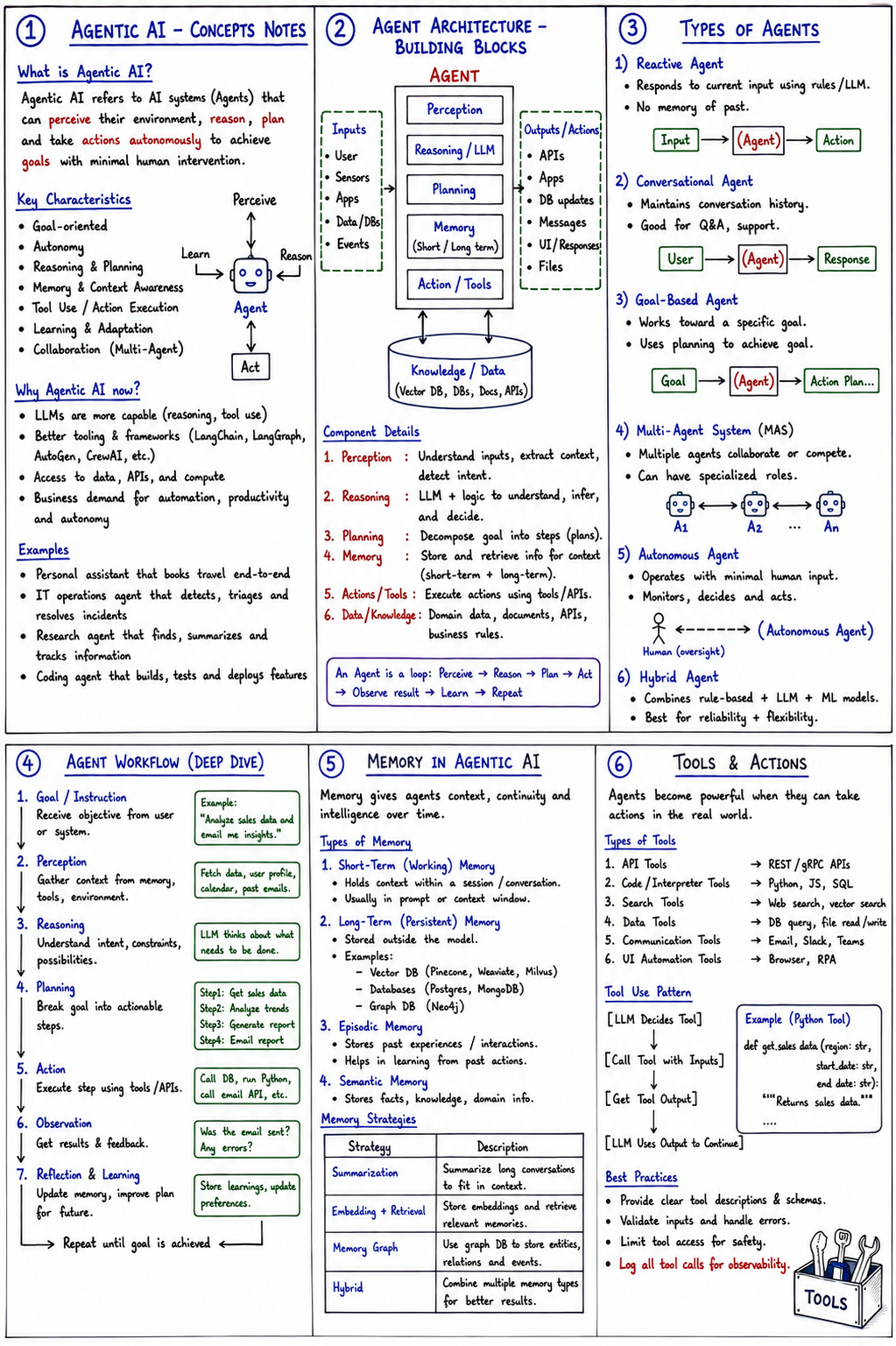
<p><em>A plain-language walkthrough of the core concepts: what an agent is, how it thinks and works, and what makes it reliable in production.</em></p>

<p><img src="/assets/images/2026-07-28-agentic-ai-concepts/agentic-concepts.png" alt="Alt text" /></p>

<hr />

<h2 id="1-agentic-ai---concepts">1. Agentic AI - Concepts</h2>

<p>An LLM on its own just answers questions. An <em>agent</em> is what you get when you point that brain at a goal and let it act on its own: it looks at the situation, thinks, makes a plan, does something, checks the result, and adjusts - with barely any hand-holding.</p>

<p>The core loop is the whole idea:</p>

<blockquote>
  <p><strong>perceive -&gt; reason -&gt; act -&gt; learn -&gt; repeat</strong></p>
</blockquote>

<p><strong>Why now?</strong> Because the brains (LLMs) finally got good enough at reasoning, the tools to wire them up matured, and businesses genuinely want work done without a human in every loop.</p>

<hr />

<h2 id="2-agent-architecture---building-blocks">2. Agent Architecture - Building Blocks</h2>

<p>This is what’s actually <em>inside</em> an agent. Inputs come in (a user, sensors, data, events), and the agent runs them through five parts:</p>

<ul>
  <li><strong>Perception</strong> - understand what’s being asked</li>
  <li><strong>Reasoning</strong> - the LLM decides what to do</li>
  <li><strong>Planning</strong> - break it into steps</li>
  <li><strong>Memory</strong> - hold context, short and long term</li>
  <li><strong>Action / Tools</strong> - actually go do it</li>
</ul>

<p>Underneath sits a knowledge store it can pull facts from. This panel is just naming the organs of the thing - the same loop from panel 1, drawn as machinery.</p>

<hr />

<h2 id="3-types-of-agents">3. Types of Agents</h2>

<p>Not all agents are equally clever, and that’s on purpose - you match the type to the job.</p>

<table>
  <thead>
    <tr>
      <th>Type</th>
      <th>What it does</th>
      <th>Good for</th>
    </tr>
  </thead>
  <tbody>
    <tr>
      <td><strong>Reactive</strong></td>
      <td>Responds to current input, no memory</td>
      <td>Simple rules; fast</td>
    </tr>
    <tr>
      <td><strong>Conversational</strong></td>
      <td>Remembers the chat</td>
      <td>Support, Q&amp;A</td>
    </tr>
    <tr>
      <td><strong>Goal-based</strong></td>
      <td>Plans toward an outcome</td>
      <td>Multi-step tasks</td>
    </tr>
    <tr>
      <td><strong>Multi-agent (MAS)</strong></td>
      <td>Several specialized agents cooperating</td>
      <td>Complex, divided work</td>
    </tr>
    <tr>
      <td><strong>Autonomous</strong></td>
      <td>Runs with almost no oversight</td>
      <td>Monitoring, self-driving processes</td>
    </tr>
    <tr>
      <td><strong>Hybrid</strong></td>
      <td>Mixes rules + LLM + ML</td>
      <td>Reliability + flexibility</td>
    </tr>
  </tbody>
</table>

<p><strong>The lesson:</strong> more autonomy isn’t always better - pick the simplest type that does the job.</p>

<hr />

<h2 id="4-agent-workflow---deep-dive">4. Agent Workflow - Deep Dive</h2>

<p>This zooms into one full pass of the loop, step by step:</p>

<ol>
  <li><strong>Goal</strong> - get the objective from a user or system</li>
  <li><strong>Perception</strong> - gather context from memory, tools, environment</li>
  <li><strong>Reasoning</strong> - figure out intent and constraints</li>
  <li><strong>Planning</strong> - break the goal into actionable steps</li>
  <li><strong>Action</strong> - execute a step using tools / APIs</li>
  <li><strong>Observation</strong> - look at the result and feedback</li>
  <li><strong>Reflection &amp; Learning</strong> - update memory, improve the plan</li>
</ol>

<p>…then repeat until the goal is achieved.</p>

<p>Made concrete: the goal is <em>“analyze sales data and email me insights,”</em> so it fetches the data, thinks, plans four steps, runs Python, checks <em>“was the email actually sent?”</em>, and stores what it learned.</p>

<p><strong>The observation and reflection steps are what separate a real agent from a script</strong> - it notices when something went wrong and corrects.</p>

<hr />

<h2 id="5-memory-in-agentic-ai">5. Memory in Agentic AI</h2>

<p>Memory is what turns a goldfish into a colleague.</p>

<ul>
  <li><strong>Short-term (working)</strong> - the current conversation; lives in the context window</li>
  <li><strong>Long-term (persistent)</strong> - stored outside the model in databases, survives across sessions</li>
  <li><strong>Episodic</strong> - “what happened last time”; past experiences it can learn from</li>
  <li><strong>Semantic</strong> - plain facts and domain knowledge</li>
</ul>

<p>Because you can’t cram everything into the context window, there are strategies to manage it: <strong>summarize</strong> old chats, <strong>embed + retrieve</strong> only the relevant bits, use a <strong>memory graph</strong> of related facts, or a <strong>hybrid</strong> of these.</p>

<p><strong>This is usually where real agent projects succeed or fail</strong> - get memory wrong and the agent feels forgetful and unreliable.</p>

<hr />

<h2 id="6-tools--actions">6. Tools &amp; Actions</h2>

<p>An agent that can only talk is a chatbot; tools are what let it <em>do things in the real world</em> - call APIs, run code, search, read/write databases, send Slack messages, drive a browser.</p>

<p>The pattern is always the same:</p>

<blockquote>
  <p><strong>LLM decides it needs a tool -&gt; calls it with inputs -&gt; gets the output -&gt; continues</strong></p>
</blockquote>

<p><strong>Best practices</strong> (the part experience teaches you the hard way):</p>

<ul>
  <li>Describe your tools clearly, with proper schemas</li>
  <li>Validate inputs and handle errors</li>
  <li>Limit what the agent is allowed to touch, for safety</li>
  <li><strong>Log every single tool call</strong> - because when an autonomous system misbehaves, the logs are the only way you’ll ever understand what it did</li>
</ul>

<hr />

<h2 id="the-thread-tying-it-together">The thread tying it together</h2>

<table>
  <thead>
    <tr>
      <th>Panels</th>
      <th>Theme</th>
    </tr>
  </thead>
  <tbody>
    <tr>
      <td>1-2</td>
      <td><strong>What an agent is</strong></td>
    </tr>
    <tr>
      <td>3-4</td>
      <td><strong>How it thinks and works</strong></td>
    </tr>
    <tr>
      <td>5-6</td>
      <td><strong>What makes it reliable in production</strong></td>
    </tr>
  </tbody>
</table>

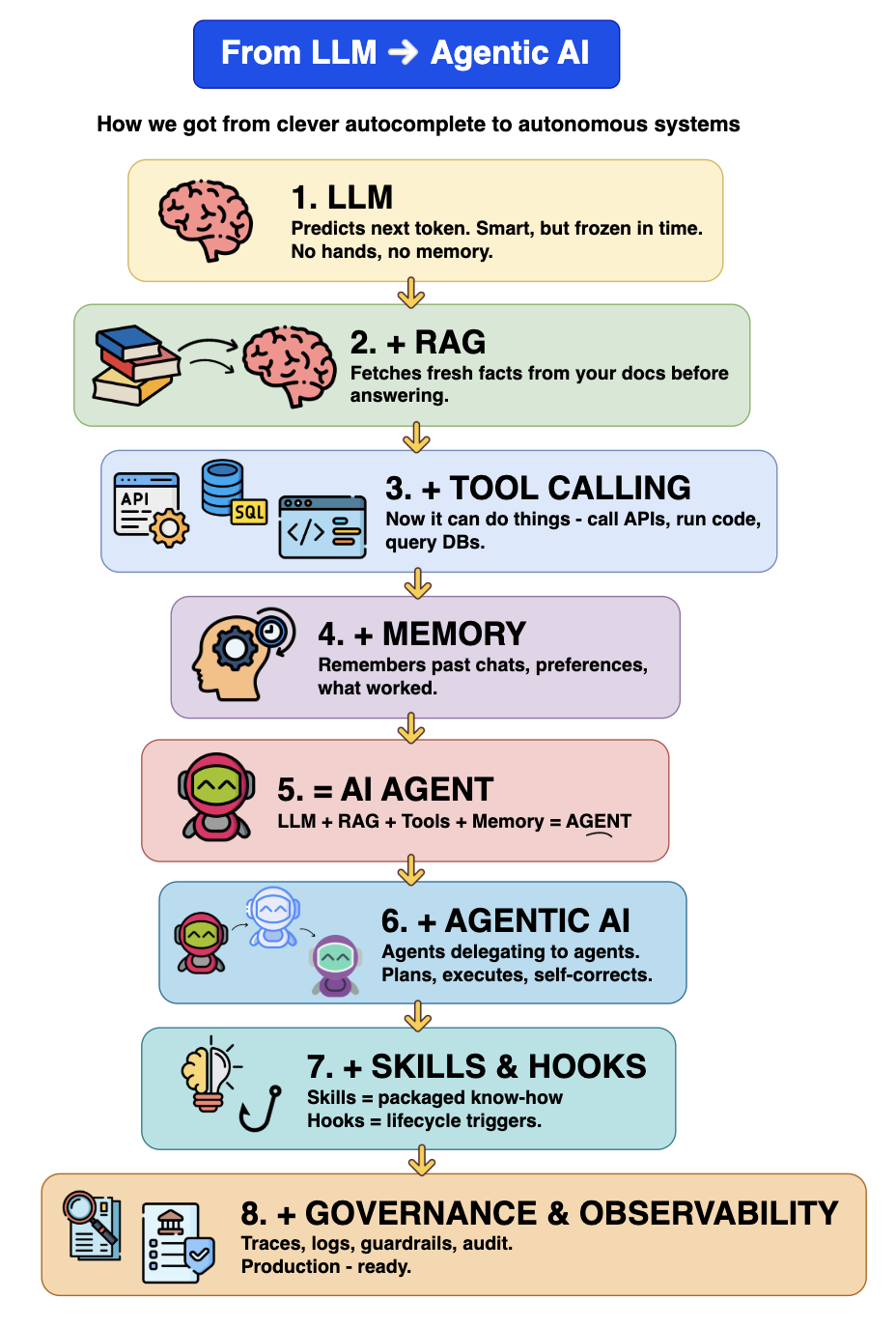
<p>Memory so it doesn’t forget, and disciplined tool use so it doesn’t go off the rails - that’s what carries an agent from an impressive demo to something you can actually trust in production.</p>]]></content><author><name></name></author><summary type="html"><![CDATA[Agentic AI - The Big Picture]]></summary></entry><entry><title type="html">From LLM to Agentic AI</title><link href="https://agenticworld.co.in/2026/07/17/agentic-journey/" rel="alternate" type="text/html" title="From LLM to Agentic AI" /><published>2026-07-17T18:15:00+05:30</published><updated>2026-07-17T18:15:00+05:30</updated><id>https://agenticworld.co.in/2026/07/17/agentic-journey</id><content type="html" xml:base="https://agenticworld.co.in/2026/07/17/agentic-journey/"><![CDATA[<p><em>How we got from clever autocomplete to autonomous systems - explained in plain language.</em></p>

<p>Think of it as hiring someone brilliant and slowly making them actually useful at your company. Each stage below is one thing you give them.</p>

<h2><img src="/assets/images/2026-07-17-agentic-journey/agentic.png" alt="Alt text" /></h2>

<h2 id="1-llm---the-brilliant-new-hire-on-day-one">1. LLM - the brilliant new hire on day one</h2>

<p>They’ve read everything, they’re sharp, they can talk about anything. But they know nothing about <em>your</em> company, they can’t pick up a phone, and they forget you the moment you leave the room.</p>

<p><strong>Pure thinking, no doing.</strong></p>

<hr />

<h2 id="2--rag---give-them-the-filing-cabinet">2. + RAG - give them the filing cabinet</h2>

<p>Before answering, they go look it up in your documents. Now instead of “here’s how expense policies generally work,” you get “here’s <em>your</em> expense policy, updated last March.”</p>

<p><strong>Same brain, but grounded in your reality instead of vague memory.</strong></p>

<hr />

<h2 id="3--tool-calling---give-them-hands">3. + Tool calling - give them hands</h2>

<p>Until now they could only <em>talk</em>. Now they can act: call an API, run a query, send an email, execute code.</p>

<p><strong>This is the biggest leap in the whole chain</strong> - the moment the system stops being an advisor and starts being a worker.</p>

<hr />

<h2 id="4--memory---give-them-a-notebook">4. + Memory - give them a notebook</h2>

<p>They remember you. Your preferences, what you asked last week, which approach failed. Without this, every conversation starts from zero - like a colleague with amnesia.</p>

<p><strong>With it, they get better at working with <em>you</em> specifically.</strong></p>

<hr />

<h2 id="5--ai-agent---thats-the-employee">5. = AI Agent - that’s the employee</h2>

<p>Nothing new here. It’s just the name for the sum: a brain, that reads your docs, has hands, and remembers. Give it a goal instead of a script, and it figures out the steps itself.</p>

<p><strong>That’s the definition of “agent” - you say <em>what</em>, not <em>how</em>.</strong></p>

<hr />

<h2 id="6--agentic-ai---now-its-a-team-not-a-person">6. + Agentic AI - now it’s a team, not a person</h2>

<p>One person can’t do everything. So agents hire agents: a planner breaks the work down, specialists handle pieces, someone reviews the output and sends it back if it’s wrong.</p>

<p><strong>The self-correction loop matters more than the delegation</strong> - a team that checks its own work is what makes multi-step tasks survivable.</p>

<hr />

<h2 id="7--skills--hooks---the-company-handbook-and-the-standard-procedures">7. + Skills &amp; Hooks - the company handbook and the standard procedures</h2>

<ul>
  <li><strong>Skills</strong> are packaged know-how: “here’s exactly how we do a client onboarding” - so the agent doesn’t reinvent it badly each time.</li>
  <li><strong>Hooks</strong> are the rules that fire automatically at certain moments: <em>before you deploy, run the tests; after any refund, log it.</em></li>
</ul>

<p><strong>Together: less improvisation, more institutional muscle memory.</strong></p>

<hr />

<h2 id="8--governance--observability---badge-camera-and-audit-trail">8. + Governance &amp; Observability - badge, camera, and audit trail</h2>

<p>Everything above makes it powerful. This makes it <em>employable</em>. You can see what it did and why (traces), stop it doing things it shouldn’t (guardrails), and prove any of it to an auditor later.</p>

<p><strong>Skip this and you have an impressive demo. Include it and you have production.</strong></p>

<hr />

<h2 id="the-through-line">The through-line</h2>

<table>
  <thead>
    <tr>
      <th>Stages</th>
      <th>What they add</th>
    </tr>
  </thead>
  <tbody>
    <tr>
      <td>1-4</td>
      <td><strong>Capability</strong></td>
    </tr>
    <tr>
      <td>5-7</td>
      <td><strong>Autonomy</strong></td>
    </tr>
    <tr>
      <td>8</td>
      <td><strong>Trust</strong></td>
    </tr>
  </tbody>
</table>

<p>Most teams get very excited about the middle and discover the hard way that the last one is what actually determines whether the thing ever leaves the lab.</p>]]></content><author><name></name></author><summary type="html"><![CDATA[How we got from clever autocomplete to autonomous systems - explained in plain language.]]></summary></entry><entry><title type="html">Large Language Model (LLM)</title><link href="https://agenticworld.co.in/2026/07/16/llm/" rel="alternate" type="text/html" title="Large Language Model (LLM)" /><published>2026-07-16T23:57:00+05:30</published><updated>2026-07-16T23:57:00+05:30</updated><id>https://agenticworld.co.in/2026/07/16/llm</id><content type="html" xml:base="https://agenticworld.co.in/2026/07/16/llm/"><![CDATA[<h2 id="an-llm-is-a-machine-that-predicts-the-next-word">An LLM is a machine that predicts the next word</h2>

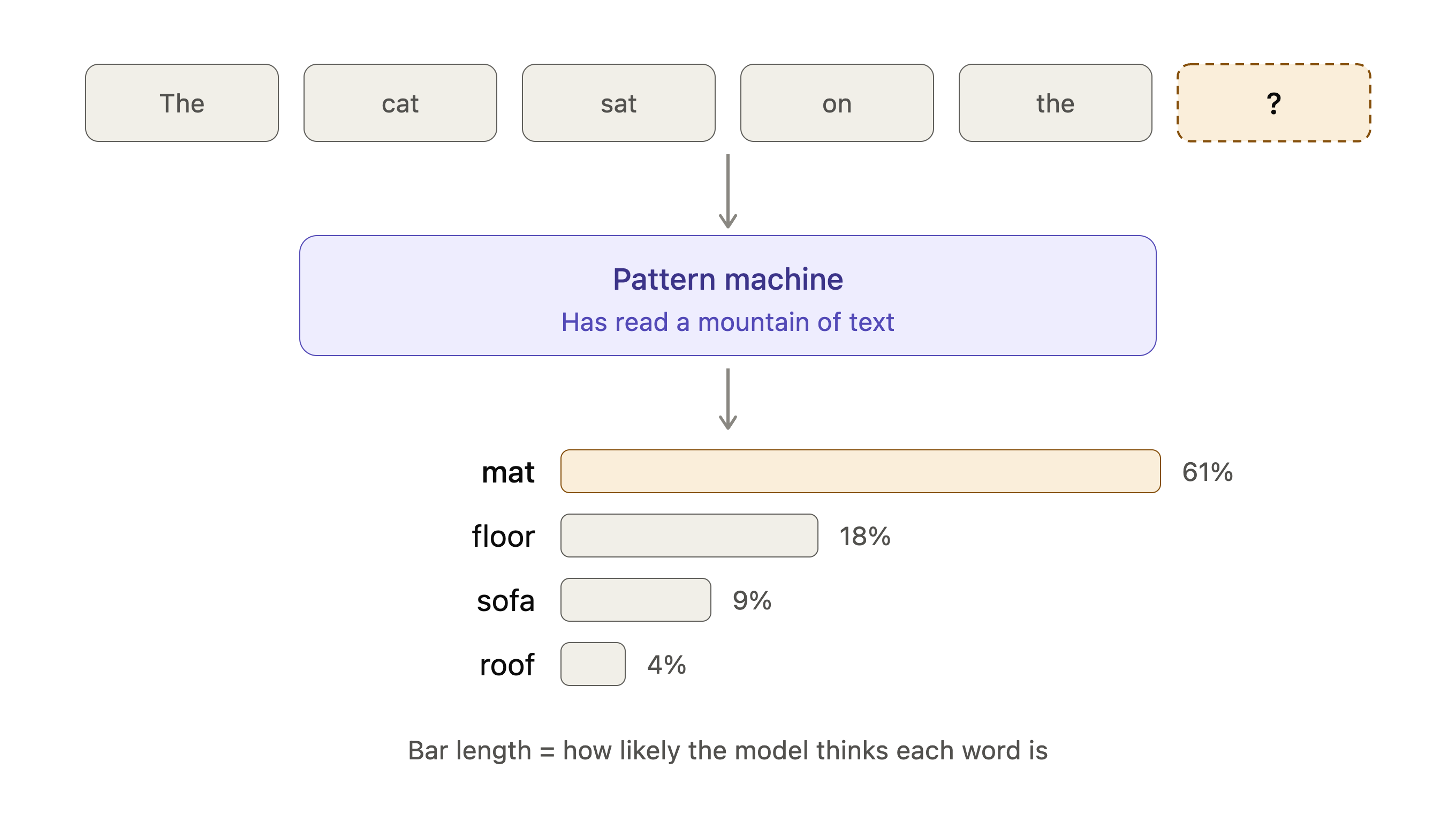
<p>That’s it. That’s the whole trick. Everything else - writing code, answering questions, drafting emails - falls out of doing that one thing extremely well, billions of times over.</p>

<p><img src="/assets/images/2026-07-16-llm/llm_next_word_prediction_intuition.png" alt="Alt text" /></p>

<p>The key parts, in plain language:</p>

<h2 id="where-the-knowledge-comes-from">Where the knowledge comes from</h2>
<p>Nobody taught it grammar or facts by hand. It was shown an enormous amount of text - books, websites, code - with words hidden, and asked to guess them. Get it wrong, adjust slightly. Repeat trillions of times. To guess well, it had to absorb spelling, grammar, facts, tone, reasoning patterns. Prediction was the exercise; understanding-ish behaviour was the side effect.</p>

<h2 id="how-you-get-whole-answers">How you get whole answers</h2>
<p>It picks a word, adds it to the sentence, then predicts the next one, over and over. Your question is just the opening - it keeps completing until it decides it’s done.</p>

<h2 id="why-it-makes-things-up">Why it makes things up</h2>
<p>It’s always producing the most plausible-sounding continuation, not looking anything up. “Plausible” and “true” usually overlap. Sometimes they don’t - and it sounds equally confident either way.</p>

<p>An analogy that holds up well: it’s like someone who has read every book in the world but remembers none of them specifically - only a deep instinct for how sentences tend to go. Ask them anything and they’ll answer fluently from that instinct. Usually right. Occasionally confidently wrong.</p>]]></content><author><name></name></author><summary type="html"><![CDATA[An LLM is a machine that predicts the next word]]></summary></entry></feed>